 Prompt Island
Prompt Island User Guide
1. What Prompt Island Is
Prompt Island is a Prompt library in the macOS menu bar. It shows a workspace for the current app; click a Prompt to copy it, then press Command-V to paste.
It does not read conversations or send Prompts. One workspace can be bound to one or more apps.
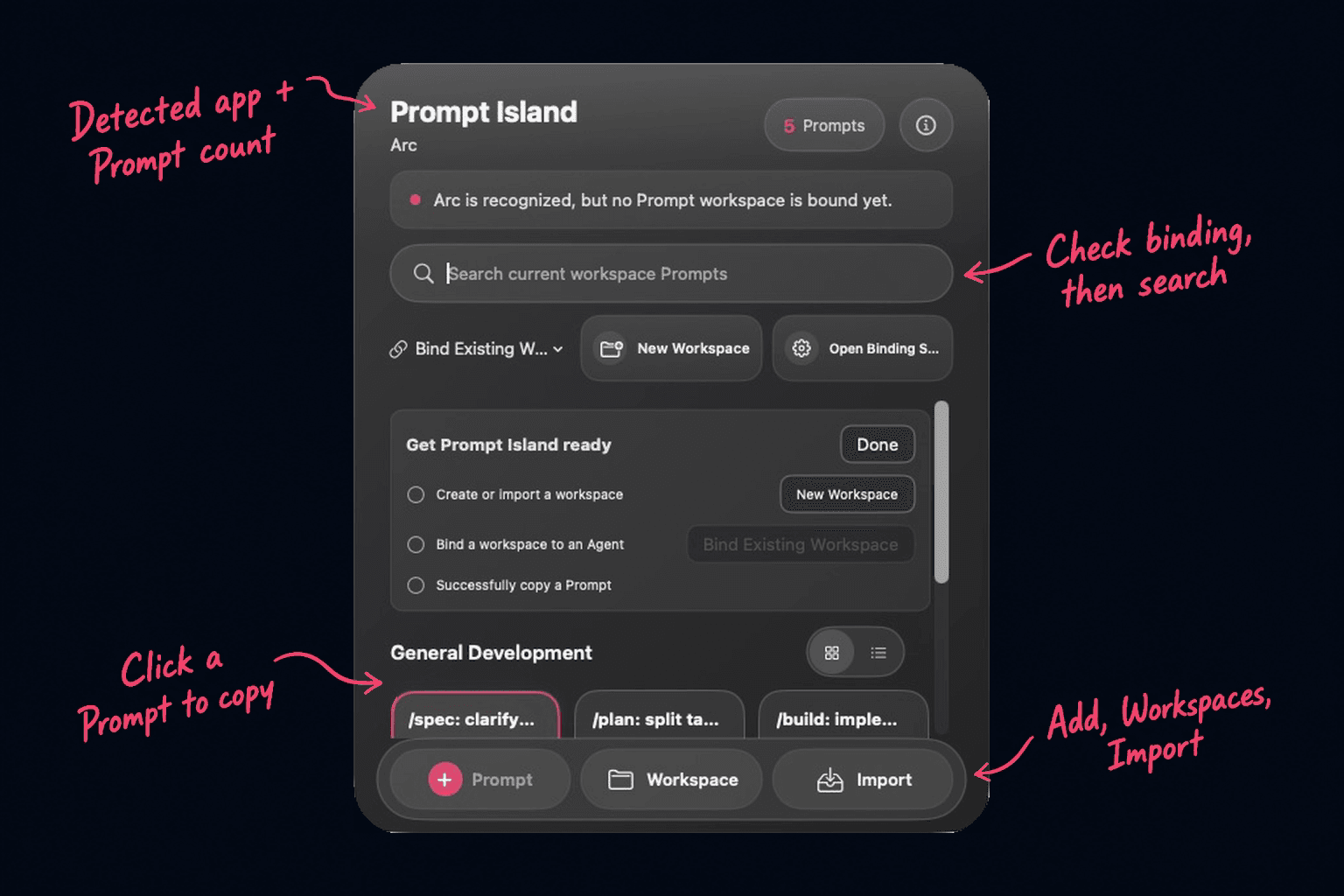
Use the main panel to find, preview, and copy Prompts.
2. First Use
- Click the menu bar capsule or press ⌃⇧P.
- Click “New Workspace,” or import a Prompt Pack.
- Enter a name, select the Agents, IDEs, terminals, or browsers to bind, then click “Create.” You can select more than one.
- Add a Prompt to an empty workspace. Imported workspaces are ready to use.
- Click a Prompt to copy it, return to the target app, and press Command-V to paste.
If you see “Waiting to detect current environment,” bring the target app to the front, then reopen the panel.
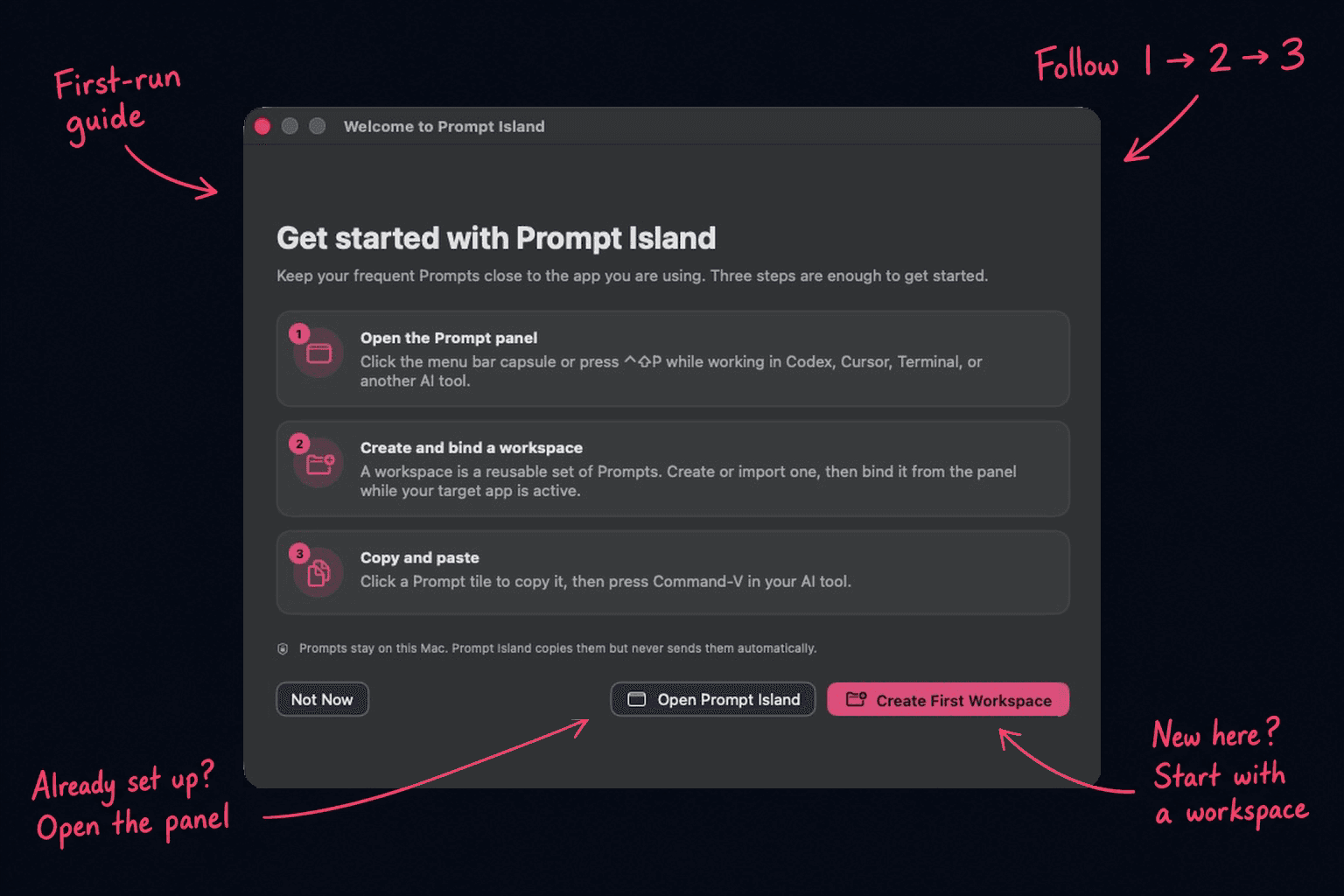
First use: open the panel, create and bind a workspace, then copy and paste.
3. Use the Main Panel
Open it by clicking the menu bar capsule, pressing ⌃⇧P, or turning on hover opening in Settings > General.
The top shows the current app and Prompt count. Search and choose Prompts in the middle. Use the bottom buttons to add a Prompt, manage workspaces, or import content. Press Esc to close.
Grid view is faster for clicking. List view is easier for long titles.
4. Create and Bind a Workspace
You do not need to switch to the target app before binding:
- Open Workspace Manager and click “New Workspace.”
- Enter a name and select one or more environments in “Bind to Agent.”
- Click “Create.” The workspace appears whenever a bound app is active.
To change bindings, select a workspace, click “Edit Workspace,” update the environments, and save. Copy a built-in sample to My Workspaces before editing it.
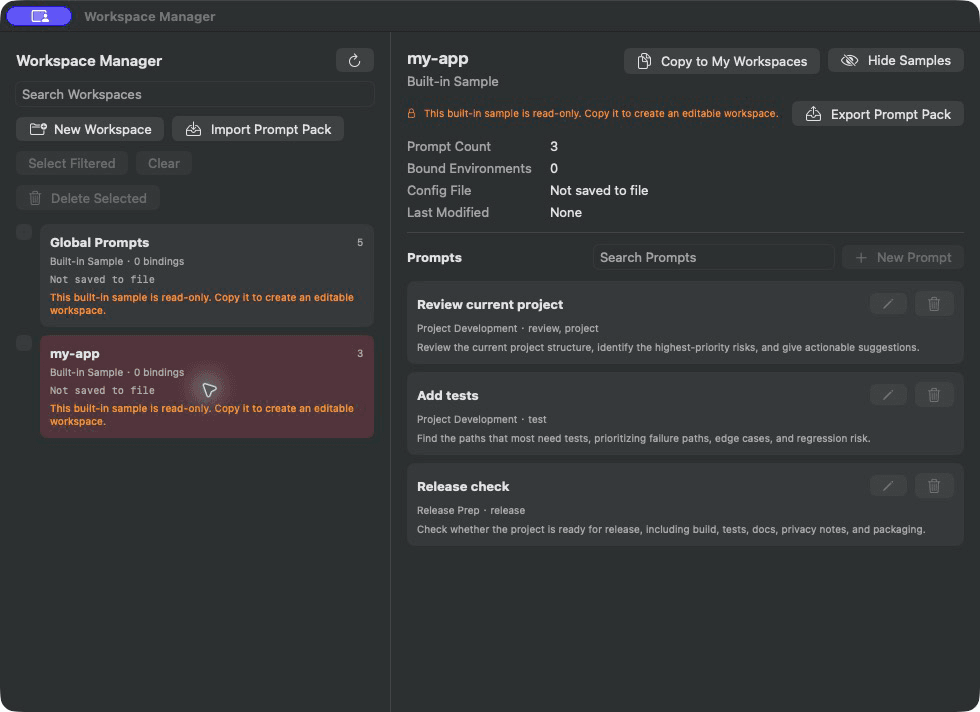
Manage workspaces on the left and their Prompts on the right.
The current version supports 23 environments:
| Type | Supported environments |
|---|---|
| Agents, IDEs, and terminals (17) | Antigravity, Antigravity IDE, ChatGPT, Claude Desktop, Cursor, Devin / Windsurf, Ghostty, Hermes, JetBrains, Kimi, Kiro, OpenCode, Terminal, Trae, VS Code, ZCode, Zed |
| Browsers (6) | Arc, Brave, Chrome, Firefox, Microsoft Edge, Safari |
Claude Code CLI and OpenCode CLI are recognized through Terminal or Ghostty. Browsers are recognized only as apps; Prompt Island does not read pages or conversations.
5. Add a Prompt
Click “Prompt” at the bottom of the main panel, or “New Prompt” in Workspace Manager.
| Field | What to enter |
|---|---|
| Save to Workspace | Choose where this Prompt is stored |
| Agent | Choose an environment, or Any Agent for all environments |
| Title | A short, recognizable action, such as “Pre-release Checklist” |
| Group | A category for similar Prompts |
| Tile Shortcut | An optional dedicated shortcut |
| Prompt Content | The full instruction copied from the tile |
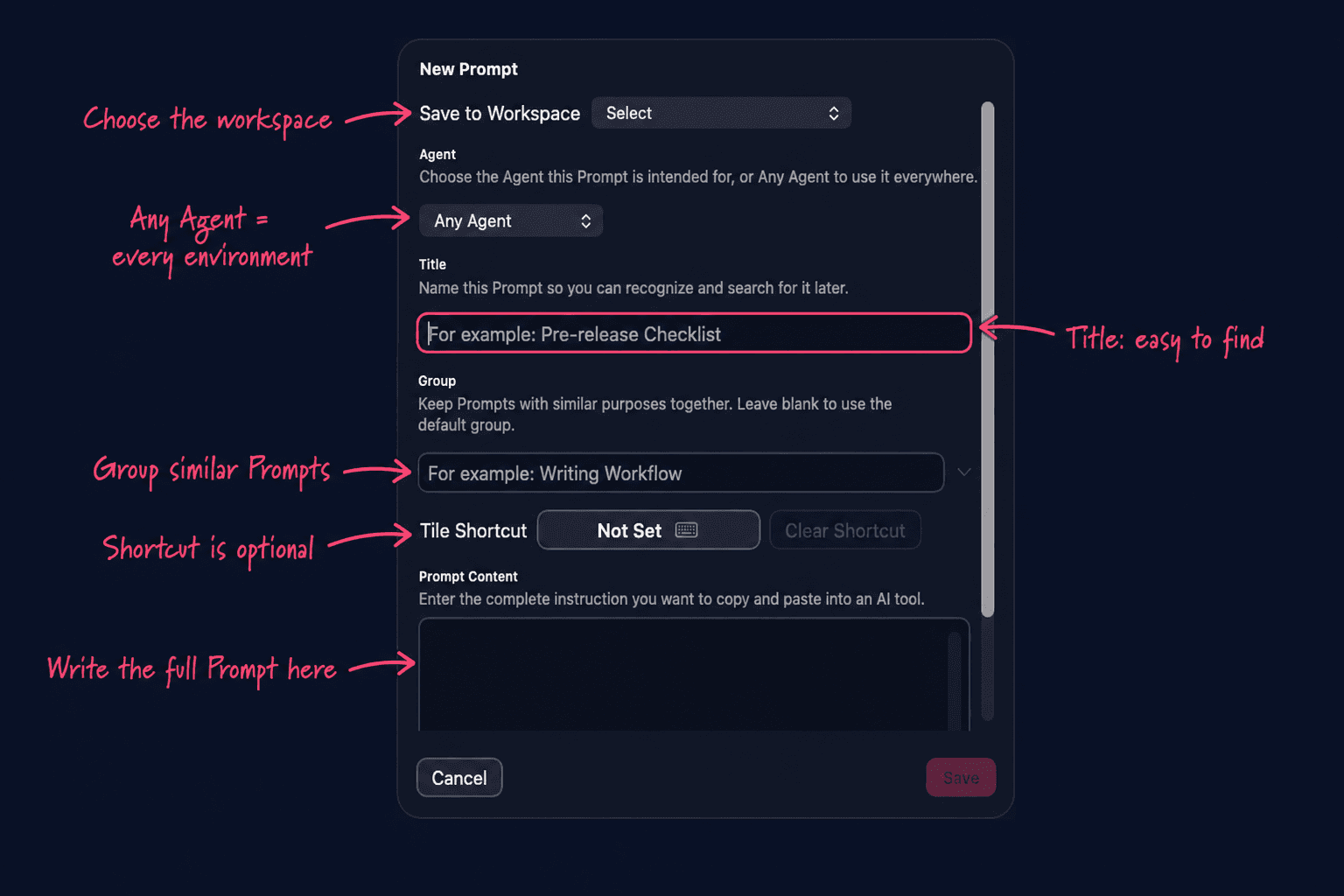
The title helps you find it. Prompt Content controls what gets copied.
6. Search, Preview, and Copy
Search checks titles, groups, and content. Hover over a tile to preview the full Prompt. A green check confirms a successful copy.
- ↑ / ↓: move the selection
- Return: copy the selected Prompt
- ⌘1 through ⌘9: copy visible Prompts 1 through 9
- Esc: close the panel
- ⌃⇧P: open or close Prompt Island
Change copy feedback in Settings > General.
7. Import and Export Prompt Packs
A Prompt Pack is a shareable Prompt workflow, usually stored as YAML.
- Import: use “Import” in the main panel or Workspace Manager > Import Prompt Pack.
- Duplicate name: a new local workspace is created; the original is not overwritten.
- Export: select a workspace and click “Export Prompt Pack.” Remove secrets, private paths, and internal information before sharing.
- Built-in Prompt Packs: install them from Settings > Prompts and Workspaces.
Prompt Island parses Prompt data but never executes file content. Invalid files are not installed.
8. Settings
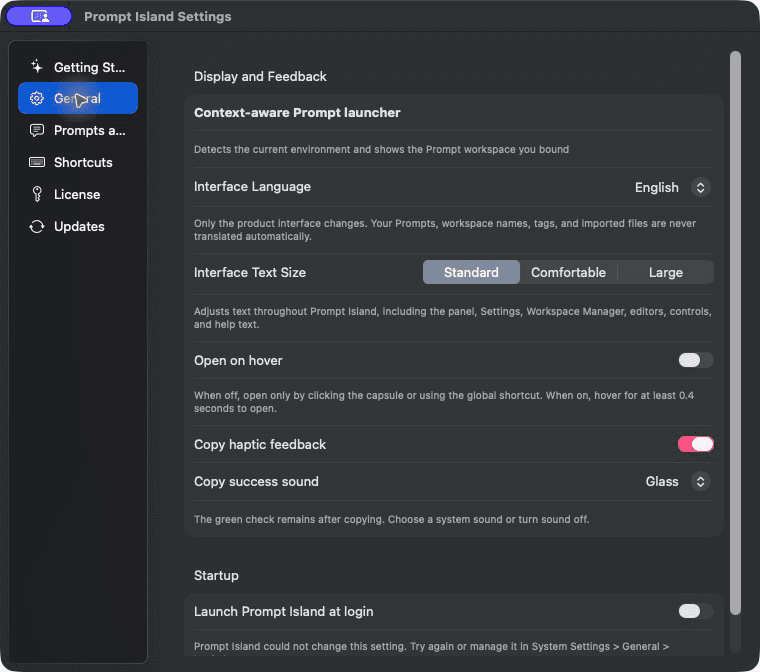
Choose an area on the left and adjust its options on the right.
| Area | Main options |
|---|---|
| Getting Started | Reopen the welcome guide |
| General | Language, text size, hover opening, copy feedback, launch at login |
| Prompts and Workspaces | Workspaces, order, history, built-in Prompt Packs |
| Shortcuts | Panel and tile shortcuts |
| License | Activation, status, device release, help |
| Updates | Check for and install updates |
Changing the interface language does not translate Prompts. Record conflicting shortcuts again in Settings > Shortcuts.
9. Trial, Purchase, and Activation
- 3-day full-feature trial: starts on the first launch that connects to the licensing service.
- $9.90 one-time purchase: no subscription or account.
- One license: covers 2 Macs.
After purchase, enter the purchase key in Settings > License. You first receive a provisional license. After the refund period, connect once to complete permanent activation; daily use can stay offline afterward.
If both device slots are used, release the old Mac in Settings > License before activating another.
10. Privacy and Local Data
Prompts and workspaces stay on your Mac. Prompt Island does not upload:
- Prompts, workspaces, or conversations
- Project paths or window titles
- Search terms or clipboard contents
- Browser pages, URLs, or history
The licensing service receives only information needed for trials and activation. Your local data is never deleted, encrypted, or held because of license status. You can still view, export, back up, or delete it.
11. FAQ
The panel keeps showing “Waiting to detect current environment.”
Bring a supported target app to the front, then reopen the panel. If it is still not recognized, click the information button at the top to check the current app.
Why is “Bind Existing Workspace” disabled?
It is only a shortcut for the current environment. You can always use Workspace Manager > Edit Workspace and select environments from the full list.
Why does clicking a Prompt not place it inside my AI tool?
Prompt Island copies but does not send. Return to the target app and press Command-V to paste.
Will my Prompts be deleted when the trial ends?
No. Some features are locked, but local data is not deleted.
Can I stay permanently offline immediately after purchase?
No. After the refund period, connect once to complete permanent activation. Daily use can stay offline afterward.
How do I request a refund or get help?
Email support@promptisland.cc within 14 days of purchase. Non-waivable local consumer rights still apply.